For a Griffith University investigation exercise, I analysed the supplied Hungry Hustle logs and built a Splunk dashboard. I then used targeted searches to answer incident-response questions and presented my findings. Hungry Hustle is a fictional scenario, not a real client or a live incident I responded to.
This retrospective is grounded in my original 30-page analysis report and accompanying presentation, both dated October 2024. Seven original appendix screenshots are cropped for publication. Some conclusions in the submission went further than the preserved evidence supports; I distinguish the observation from the hypothesis below. No new Splunk searches or mitigations were performed for this article.
Build a dashboard that points to questions, not verdicts.
I organised the dashboard around four views: a total count of HTTP 403-labelled events, the sources with the most such events, sessions selected by duration or event count, and a one-minute request chart with a statistical reference line. The global and traffic time selectors were meant to let me move from a broad overview to a narrower search. A panel is a triage aid; it does not identify an attacker on its own.
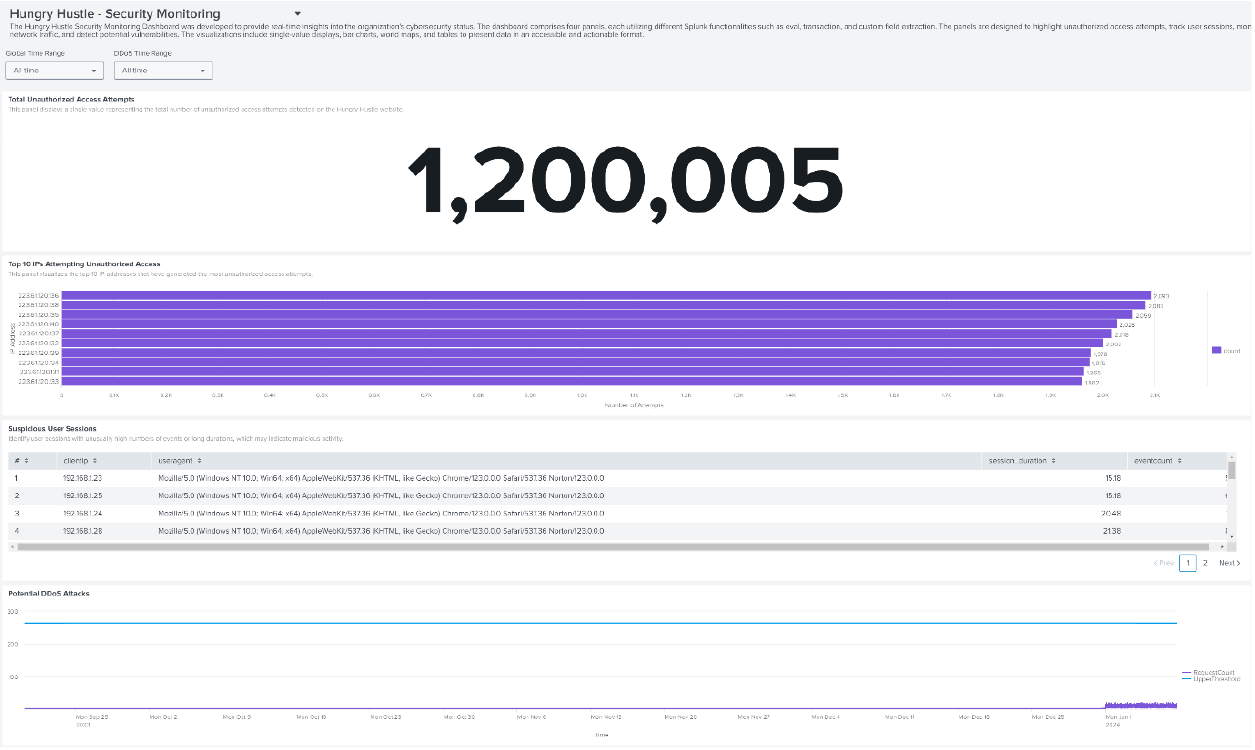
The single-value panel used this original SPL to aggregate matching access-log events:
index="hungryhustle" "403" sourcetype="access_combined"
| stats count as UnauthorisedAttempts
The search counts events containing 403 in the chosen sourcetype. The dashboard labelled them “unauthorised attempts,” but a forbidden response can also be normal access-control behaviour. I would inspect status fields, requested paths, actors and surrounding requests before treating the number as hostile activity.
Rank sources before deciding what they mean.
I grouped 403-labelled events by clientip, sorted by count and kept the top ten. That made repeated sources visible without reading every raw event. The highest bar in the captured panel is 2,093 events. Neither that count nor an IP address alone says whether the requests were malicious, automated, misconfigured or legitimate users hitting restricted pages.
index="hungryhustle" "403" sourcetype="access_combined"
earliest=$earliest$ latest=$latest$
| stats count by clientip
| sort -count
| head 10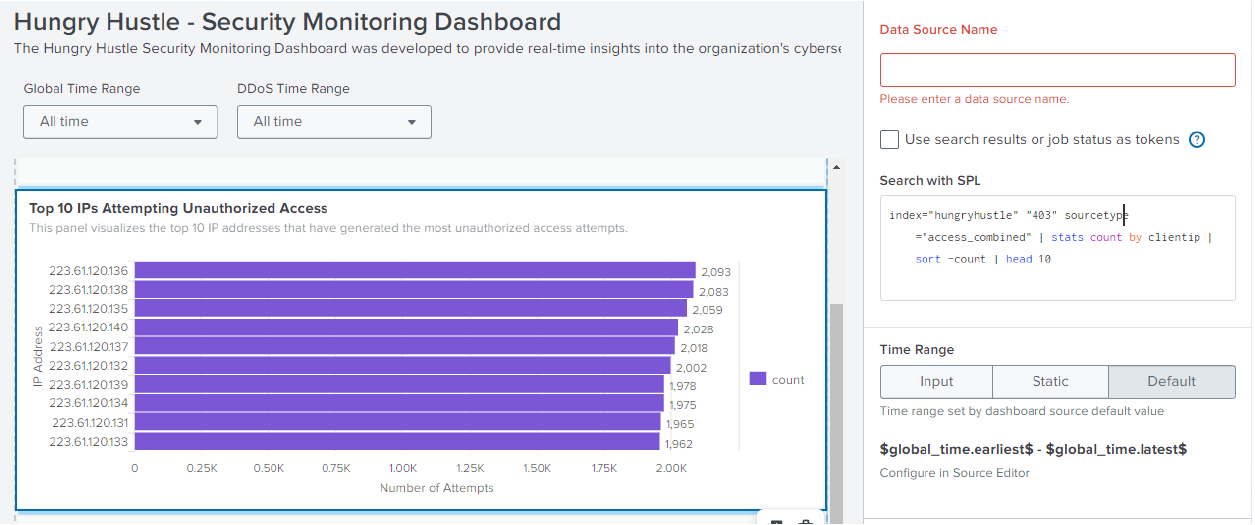
My next check would be to compare each source’s paths and status-code mix over time, then look for authentication records or other telemetry. The report also used iplocation clientip to group 403-labelled events by country. That is an enrichment and aggregation, not proof that users from those countries caused an attack.
Use a threshold to find sessions worth reviewing.
I used transaction to group access events by client IP and user agent, then calculated duration in minutes. The panel retained a session if it had more than 50 events or lasted more than 15 minutes. In the visible rows, sessions around 15.18 minutes have only five or six events: they met the duration condition, not the high-volume condition.
index="hungryhustle" sourcetype="access_combined"
earliest=$earliest$ latest=$latest$
| transaction clientip useragent maxspan=30m maxpause=5m
| eval session_duration=round(duration/60,2)
| where eventcount > 50 OR session_duration > 15
| table clientip useragent session_duration eventcount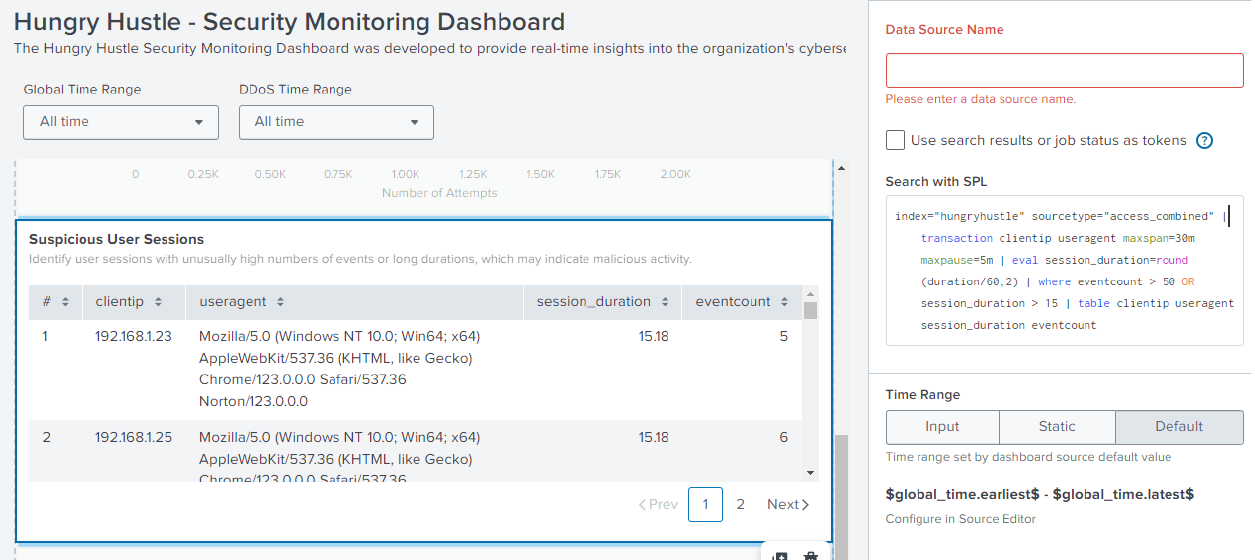
Trace an attachment back to the machine in the scenario.
The exercise asked about unusual activity from an administrator’s machine during an absence. I first searched for the administrator’s scenario email to identify the host, then searched events from that host while excluding the normal account string. One retained mail event had the subject “SSH Key” and an attachment named empe.ppk, a PuTTY private-key file extension. That is a useful lead for a credential-exposure investigation.
index="hungryhustle" "ip-192-168-1-25.ec2.internal"
NOT "sam_muller@hungryhustle.website@localhost"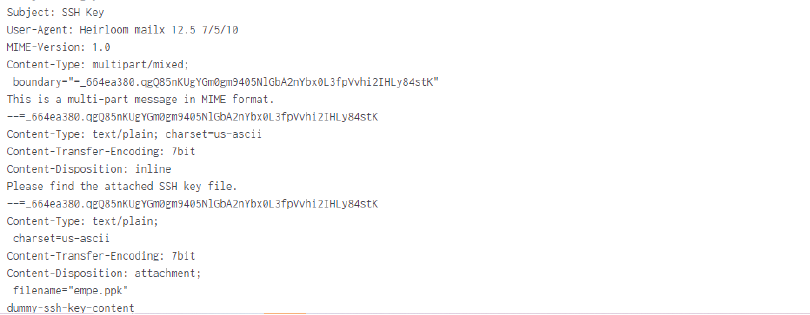
The appropriate response in a real case would be to verify the attachment’s contents and account authority, determine where the message went, and rotate or revoke a real key if exposure were confirmed. The report recommended action; it does not document that a credential was revoked or that access was gained with this attachment.
Find the payload without claiming execution.
I searched the web logs for script markers and JavaScript strings. The report includes a GET /checkout?item=... request containing a script-shaped payload and an external-looking fetch URL. This demonstrates that the request appeared in the supplied logs. It does not show whether the application reflected it, whether a browser executed it, or whether any data was sent.
index="hungryhustle" ("<script>" OR "javascript:" OR "alert(")
To establish an XSS vulnerability, I would need a controlled reproduction showing where the input appears in a rendered response and whether browser execution is possible. Input handling and output encoding were recommendations in the assignment, not fixes I implemented on this fictional website.
Separate a high client count from an outage cause.
The dashboard’s fourth panel plotted one-minute request counts and a reference threshold calculated as the overall mean plus three standard deviations. It was intended to make unusual traffic visible, but the preserved all-time chart spans a different period from the reported May outage. It cannot by itself verify that outage or a DDoS attack.
index="hungryhustle" sourcetype="access_combined"
earliest=$earliest$ latest=$latest$
| timechart span=1m count as RequestCount
| eventstats avg(RequestCount) as AvgRequestCount,
    stdev(RequestCount) as StdDevRequestCount
| eval UpperThreshold=AvgRequestCount + (3 * StdDevRequestCount)
| fields _time, RequestCount, UpperThreshold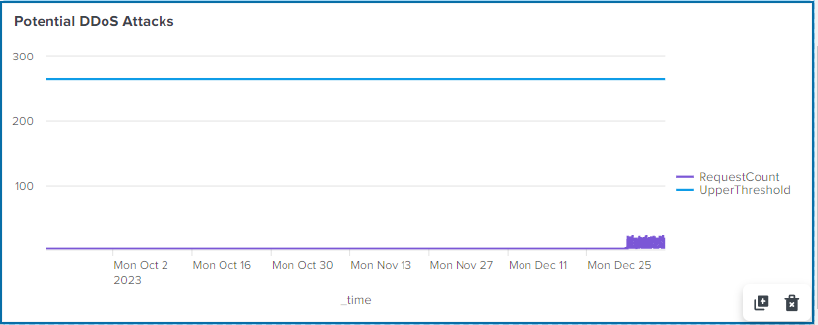
For the scenario’s stated 19 May 2024, 09:00–10:00 window, I narrowed the search to GET requests and counted distinct clientip values:
index="hungryhustle" earliest="05/19/2024:09:00:00"
latest="05/19/2024:10:00:00" "GET"
| stats dc(clientip) as unique_ips
The count is a reason to inspect request rate, status codes, source distribution, server health and network telemetry. The original report concluded that a DDoS attack caused the outage, but those corroborating measurements are not preserved here. The presentation also says mitigation was implemented; the sources do not document a deployed mitigation, so I treat it as a recommendation rather than completed work.
What this investigation taught me.
I learned to move between broad monitoring and narrow searches: constrain the time window, group by the right field, inspect a raw event when a count looks important, and check whether the result really answers the question. The transaction, stats, dc, timechart and eval commands each served a different part of that process.
Revisiting the submission has been just as useful. Its labels sometimes promote an indicator into a confirmed incident: a 403 becomes an “unauthorised attempt,” a script request a “successful XSS exploit,” and a high distinct-IP count a proven DDoS cause. I would now write those as hypotheses and state what additional evidence is needed before making an incident finding. I did not test the fictional web application, validate key usability, investigate infrastructure health, or deploy the recommended mitigations.
Sources: original 3014ICT_BR_Splunk_Report.pdf (14 October 2024) and accompanying Hungry Hustle Security Analysis Report presentation. Seven selected appendix screenshots are shown with publication-safe crops; the full submissions remain private. Read the evidence notes and limitations.